Publishing a Roq Site
| If you find any issue or missing info, be awesome and edit this document to help others Roqers. |
Generating your Roq site
This command:
roq generate🚀 The site will be generated in target/roq, use roq serve to serve it.
Without the Roq CLI using Maven:
QUARKUS_ROQ_GENERATOR_BATCH=true ./mvnw -B package quarkus:runRoq GitHub Action
Roq provides a GitHub action to publish to GitHub pages or other services.
To GitHub Pages
The deploy workflow file .github/workflows/deploy.yml is already included when you create a project with roq create (view source). If you don’t have it, create it from the source link.
Then enable GitHub Pages in your repository:
-
Go to Settings > Pages
-
Under Build and deployment, select GitHub Actions as the source
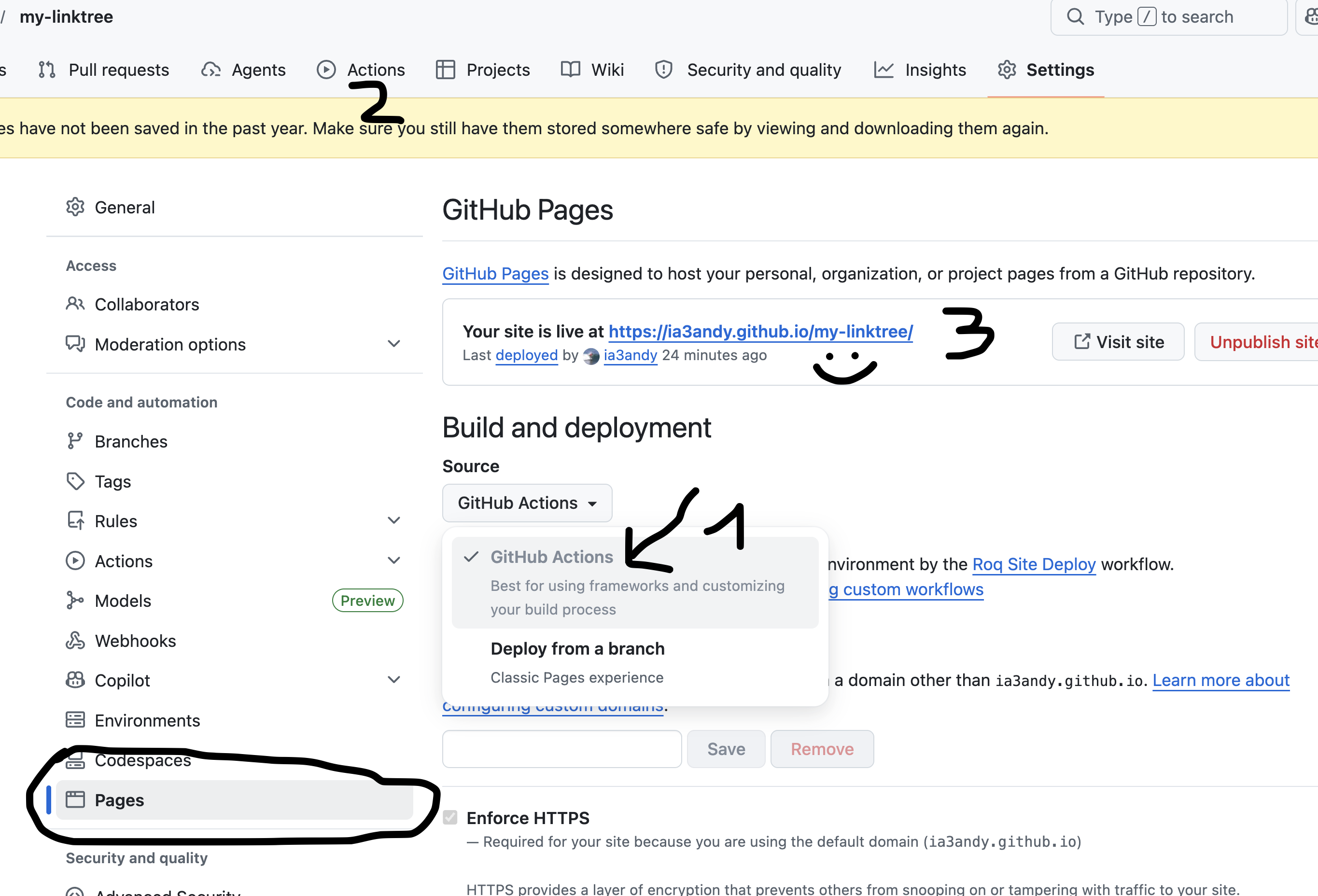
Push to main and the workflow will run automatically. After a minute or two, your site will be live!
The workflow also runs daily to publish any scheduled content (posts with a future date).
To other services
## Deploy to another service for your Quarkus Roq site.
name: Roq Site Deploy other

on:
  push:
    branches: [ main ]   # Switch to the branch which should be deployed to GitHub Pages
  workflow_dispatch:

jobs:
  build:
    runs-on: ubuntu-latest
    steps:
      - uses: actions/checkout@v6
      - name: Generate Roq Site
        uses: quarkiverse/quarkus-roq@v1.1
        with:
          github-pages: false
      - name: Publishing blog
        uses: actions/upload-artifact@v4
        with:
          name: site
          path: target/roq
          retention-days: 3
This will create a GitHub artifact named site that you can download from another job (or another workflow). For example, the PR Preview workflow of Roq publishes to Surge.
Gitlab CI
Add this file at the root of your Gitlab repository
stages:
  - build
  - deploy

build_roq:
  # Look for appropriate maven docker images in https://hub.docker.com/_/maven/tags
  image: "maven:3.9.9-eclipse-temurin-23-alpine"
  stage: build
  # Generate the static site on merge request events and on the main branch
  script:
    - QUARKUS_ROQ_GENERATOR_BATCH=true mvn -B -q package quarkus:run
  rules:
    - if: '$CI_PIPELINE_SOURCE == "merge_request_event"'
    - if: '$CI_COMMIT_BRANCH == $CI_DEFAULT_BRANCH'
  artifacts:
    reports:
      junit: target/surefire-reports/*.xml
    paths:
      - target/roq
      - target/surefire-reports

deploy_roq:
  image: alpine
  pages: true
  stage: deploy
  # For main branch take the artifacts from `build_roq` and deploy them.
  needs:
    - build_roq
  script:
    - cp -R target/roq public
    - echo "Quarkus Roq static site deployed to Gitlab Pages at $CI_PAGES_URL"
  rules:
    - if: '$CI_COMMIT_BRANCH == $CI_DEFAULT_BRANCH'
  artifacts:
    paths:
      - public
If everything goes well the pipeline will deploy, the url of the deployment is found via these options:
-
Console output of
deploy_roqjob. -
Clicking
Deploy⇒Pageson the project sidebar -
Navigating to the url
https://gitlab.example.com/user-or-organization/projectpath/project/pages